> ## Documentation Index
> Fetch the complete documentation index at: https://docs.nycadultedlabels.nyc/llms.txt
> Use this file to discover all available pages before exploring further.
# Bulk upload
> Import students from CSV with preview validation, duplicate removal, and NYC address checks.
**Students → Bulk Upload** (`/admin/students/bulk-upload`)
 ## Required columns
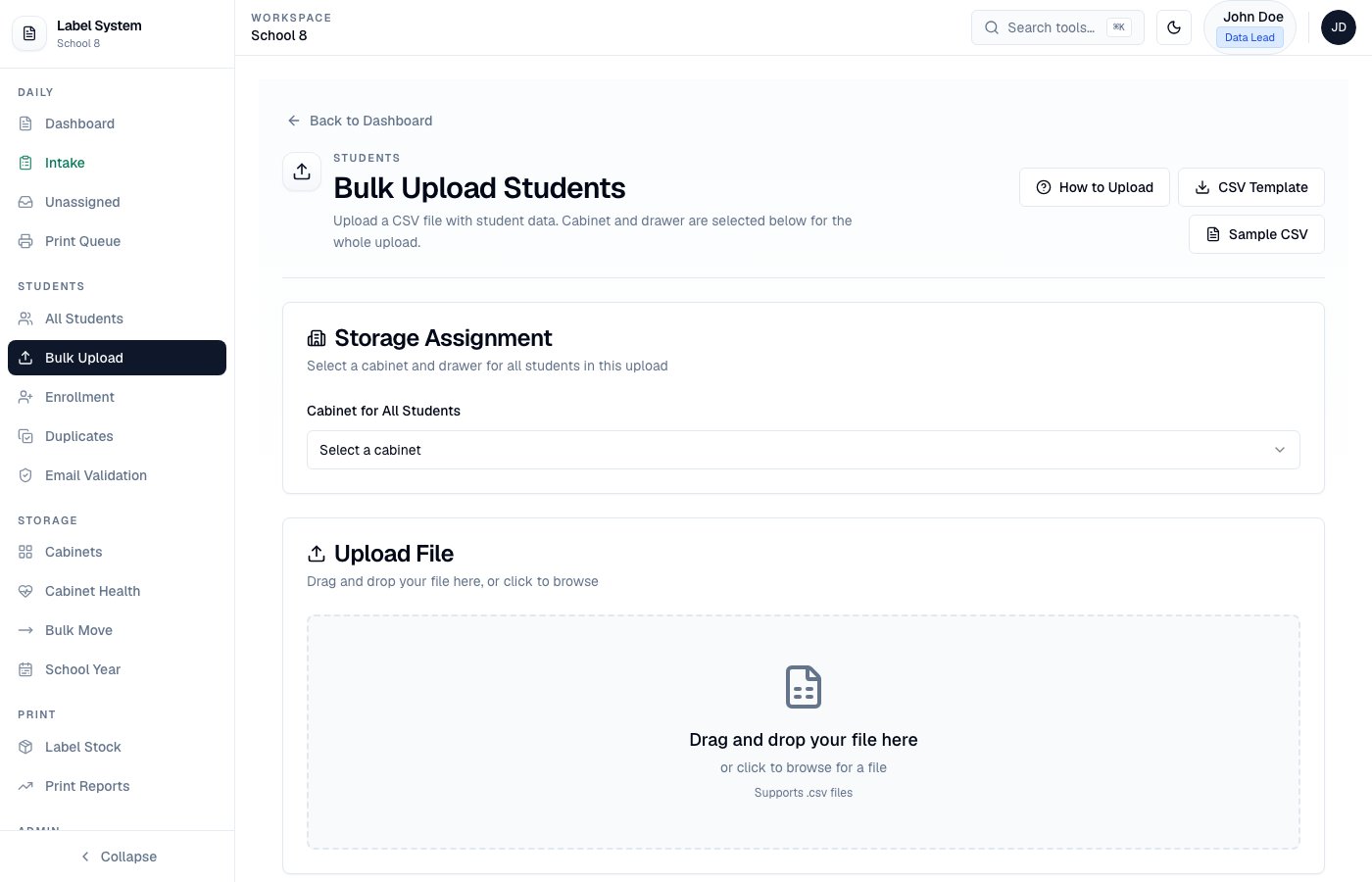
Cabinet and drawer are selected on the upload screen for the entire file. After a successful upload with no leftover blocked rows, you return to the **Dashboard**.
```csv theme={null}
firstName,lastName,dob,fiscalYear,status,startDate,email
```
`studentId` in the CSV is optional — the server generates Label ID and demographic Student ID.
Dates may be `YYYY-MM-DD` or `M/D/YY` (normalized on import). Stored DOBs are calendar dates (no timezone day-shift).
## Optional address columns
```csv theme={null}
address,apt,city,state,zip
```
| Column | Example | Notes |
| --------- | -------------- | -------------------------------------------------------- |
| `address` | `690 Grand St` | Street / building |
| `apt` | `4B` | Also accepts `unit`, `suite`, `address2`, `AddressLine2` |
| `city` | `Brooklyn` | Borough or city |
| `state` | `NY` | |
| `zip` | `11211` | |
Apartment can live in `address` (e.g. `690 Grand St Apt 4B`) **or** a separate `apt` column. On import, the system normalizes into street + `apt` fields.
## Preview and validation
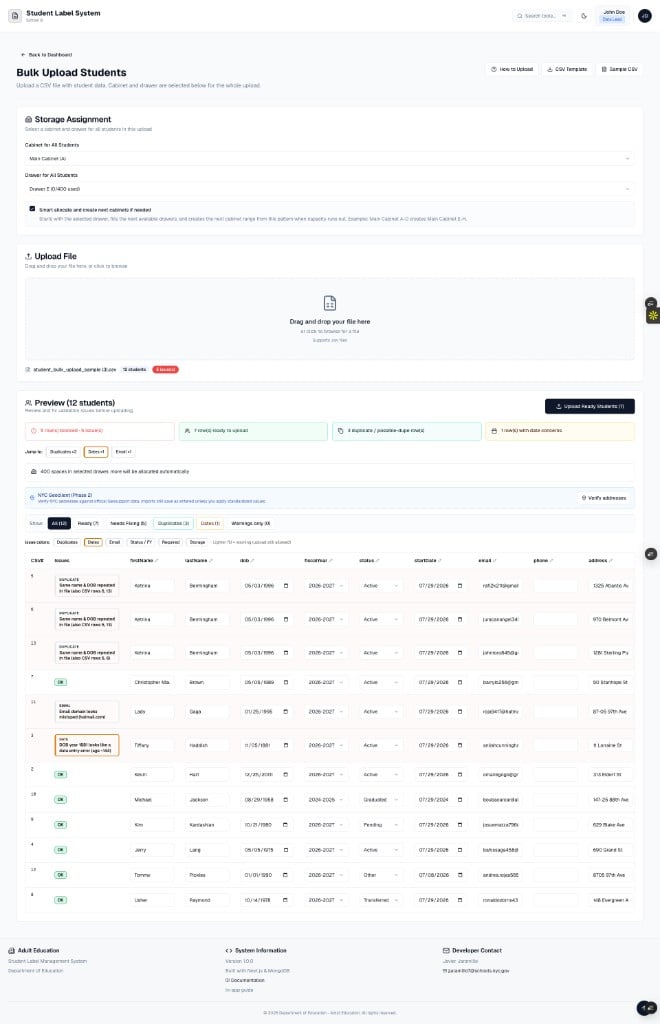
After you load a file, the preview table shows every row with issue badges and filters (**All**, **Ready**, **Needs Fixing**, **Duplicates**, **Dates**, **Warnings**).
## Required columns
Cabinet and drawer are selected on the upload screen for the entire file. After a successful upload with no leftover blocked rows, you return to the **Dashboard**.
```csv theme={null}
firstName,lastName,dob,fiscalYear,status,startDate,email
```
`studentId` in the CSV is optional — the server generates Label ID and demographic Student ID.
Dates may be `YYYY-MM-DD` or `M/D/YY` (normalized on import). Stored DOBs are calendar dates (no timezone day-shift).
## Optional address columns
```csv theme={null}
address,apt,city,state,zip
```
| Column | Example | Notes |
| --------- | -------------- | -------------------------------------------------------- |
| `address` | `690 Grand St` | Street / building |
| `apt` | `4B` | Also accepts `unit`, `suite`, `address2`, `AddressLine2` |
| `city` | `Brooklyn` | Borough or city |
| `state` | `NY` | |
| `zip` | `11211` | |
Apartment can live in `address` (e.g. `690 Grand St Apt 4B`) **or** a separate `apt` column. On import, the system normalizes into street + `apt` fields.
## Preview and validation
After you load a file, the preview table shows every row with issue badges and filters (**All**, **Ready**, **Needs Fixing**, **Duplicates**, **Dates**, **Warnings**).
 ### What gets checked
| Category | Examples | Result |
| --------------- | ---------------------------------------------------------------------------- | ------------------------------ |
| **Required** | Missing first/last name, DOB, start date, fiscal year, status | Blocking |
| **Dates** | Future DOB, impossible year (e.g. 1851), start date = DOB, start before DOB | Blocking or warning |
| **Duplicates** | Same name + DOB in file or already in the system; duplicate email / Label ID | Blocking |
| **Email** | Missing `@`, bad domain typos (e.g. `.con`, `hatmail.com`) | Blocking |
| **Status** | `Archived` on create; unknown status values | Blocking |
| **Fuzzy match** | Similar name + same DOB | Warning (upload still allowed) |
Use the **Remove** control in the first column (sticky while you scroll) to drop duplicate or unwanted rows before upload. Duplicate rows show a clearer **Remove** button.
Click any cell to fix values — validation updates immediately.
## Features
* Download CSV template or sample file from the upload page
* Inline editing of preview rows
* Address warnings (NYC ZIP/borough) — amber, not blocking
* **Verify addresses** — NYC Geoclient batch verify; **Apply standardized** updates street while keeping apt
* Auto-generates Label ID and Student ID; assigns drawer **Section 01–08** automatically
* Smart allocate across drawers / next cabinets when capacity runs out
### CSV template
```csv theme={null}
firstName,lastName,dob,fiscalYear,status,startDate,email,studentId,address,apt,city,state,zip
```
Sample files in the app: `/student_bulk_upload_template.csv` and `/student_bulk_upload_sample.csv`
## After import
Review students on the **Dashboard**. Location shows cabinet, drawer, and section (Data Lead view).
School-wide address review: **Students → All Students** (`/admin/students/all`).
See [Address and NYC verification](/reference/address-and-verification) and [Cabinets and drawers](/storage/cabinets-and-drawers).
### What gets checked
| Category | Examples | Result |
| --------------- | ---------------------------------------------------------------------------- | ------------------------------ |
| **Required** | Missing first/last name, DOB, start date, fiscal year, status | Blocking |
| **Dates** | Future DOB, impossible year (e.g. 1851), start date = DOB, start before DOB | Blocking or warning |
| **Duplicates** | Same name + DOB in file or already in the system; duplicate email / Label ID | Blocking |
| **Email** | Missing `@`, bad domain typos (e.g. `.con`, `hatmail.com`) | Blocking |
| **Status** | `Archived` on create; unknown status values | Blocking |
| **Fuzzy match** | Similar name + same DOB | Warning (upload still allowed) |
Use the **Remove** control in the first column (sticky while you scroll) to drop duplicate or unwanted rows before upload. Duplicate rows show a clearer **Remove** button.
Click any cell to fix values — validation updates immediately.
## Features
* Download CSV template or sample file from the upload page
* Inline editing of preview rows
* Address warnings (NYC ZIP/borough) — amber, not blocking
* **Verify addresses** — NYC Geoclient batch verify; **Apply standardized** updates street while keeping apt
* Auto-generates Label ID and Student ID; assigns drawer **Section 01–08** automatically
* Smart allocate across drawers / next cabinets when capacity runs out
### CSV template
```csv theme={null}
firstName,lastName,dob,fiscalYear,status,startDate,email,studentId,address,apt,city,state,zip
```
Sample files in the app: `/student_bulk_upload_template.csv` and `/student_bulk_upload_sample.csv`
## After import
Review students on the **Dashboard**. Location shows cabinet, drawer, and section (Data Lead view).
School-wide address review: **Students → All Students** (`/admin/students/all`).
See [Address and NYC verification](/reference/address-and-verification) and [Cabinets and drawers](/storage/cabinets-and-drawers).