> ## Documentation Index
> Fetch the complete documentation index at: https://docs.nycadultedlabels.nyc/llms.txt
> Use this file to discover all available pages before exploring further.
# Address and NYC verification
> Capture street and apartment separately, verify with NYC Geoclient, and use addresses in duplicate matching.
Student addresses are stored as separate fields — **street**, **apt**, **city**, **state**, and **ZIP** — and can be verified against official NYC Geosupport data.
## Address fields
| Field | Example | Notes |
| --------- | ---------------- | ---------------------------------------------------- |
| `address` | `690 Grand St` | Building / street only after normalization |
| `apt` | `4B` or `Apt 4B` | Apartment, unit, or suite — stored in its own column |
| `city` | `Brooklyn` | Borough or city |
| `state` | `NY` | Defaults to NY on intake |
| `zip` | `11211` | Five-digit ZIP |
If older records still have the apartment embedded in the street line (e.g. `690 Grand St Apt 4B`), the system splits it on read. Re-saving or running NYC verify writes the separate `apt` field.
## Where addresses are captured
Contact & Address section with paste, parse, and **Verify with NYC Geoclient**.
Optional `address`, `apt`, `city`, `state`, `zip` columns in CSV.
**Students → All Students** (`/admin/students/all`) — edit address, verify batch, export with Apt column.
Side-by-side address comparison for flagged and auto-detected pairs.
## NYC Geoclient verification
When `NYC_GEOCLIENT_SUBSCRIPTION_KEY` (or `NYC_GEOCLIENT_APP_KEY`) is configured:
1. **Building lookup** — Geoclient validates house number + street + borough/ZIP.
2. **Apartment preserved** — unit/apt is **not** sent to Geosupport; it is re-attached after standardization.
3. **Saved metadata** — verification status, warnings, coordinates, and `addressStandardized` are stored on the student.
### Typical workflow (Data Lead)
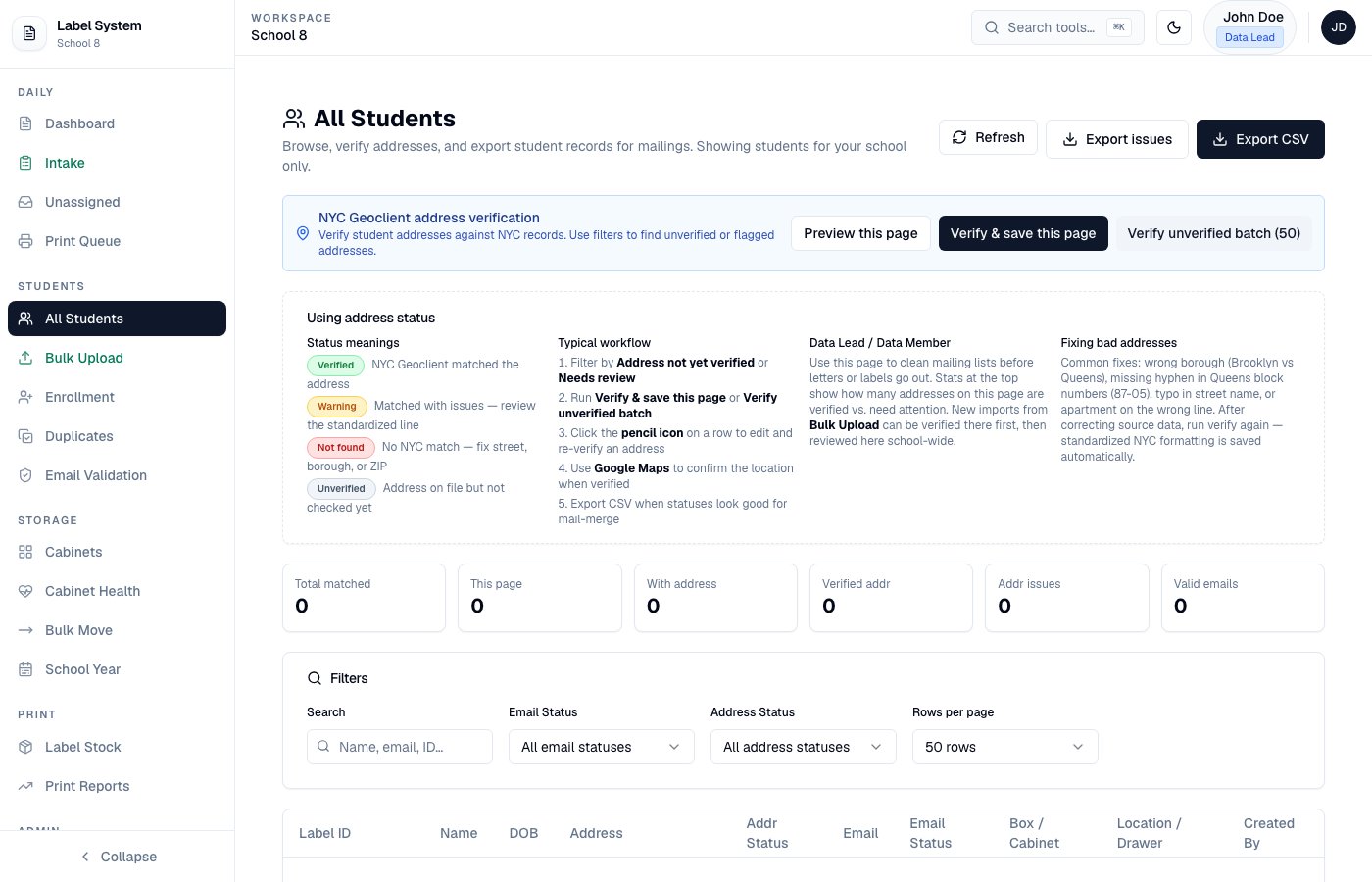 Open **Students → All Students**. Filter by **Address not yet verified** or **Needs review**.
Run **Verify & save this page** or **Verify unverified batch**. Standardized street data is written; apt stays in `apt`.
Use the pencil icon on a row to edit street/apt/city/ZIP, then verify again from the dialog.
Export CSV includes street, **Apt**, city, state, and ZIP as separate columns.
### Address status badges
| Status | Meaning |
| -------------- | --------------------------------------------------- |
| **Verified** | NYC Geoclient matched the building |
| **Warning** | Matched with corrections — review standardized line |
| **Not found** | No NYC match — check street, borough, or ZIP |
| **Unverified** | Address on file but not checked yet |
## Duplicate matching uses addresses
The intake duplicate check and **Students → Duplicates** both compare home addresses:
| Match | Meaning |
| ------------------------- | ------------------------------------------------------- |
| **Same verified address** | Standardized NYC data matches — strong duplicate signal |
| **Same address** | Street + apt + city/ZIP align |
| **Same building** | Same building, different unit — likely siblings |
| **Different address** | May be siblings at a new home, or a move |
Auto-detection on the Duplicates page can surface pairs with **same DOB + same address** even when names do not fuzzy-match.
## Paste and CSV formats
**Paste examples (intake or edit dialog):**
```
1281 Sterling Pl Apt 2, Brooklyn, NY 11213
1281 Sterling Pl, Apt 2, Brooklyn, NY 11213
```
**Bulk CSV** — apt in its own column or embedded in `address`:
```csv theme={null}
firstName,lastName,dob,fiscalYear,status,startDate,email,studentId,address,apt,city,state,zip
```
Accepted apt column aliases: `apt`, `unit`, `suite`, `address2`, `AddressLine2`.
## Related pages
* [Intake workflow](/workflows/intake)
* [Duplicates and siblings](/workflows/duplicates-and-siblings)
* [Bulk upload](/reference/bulk-upload)
Open **Students → All Students**. Filter by **Address not yet verified** or **Needs review**.
Run **Verify & save this page** or **Verify unverified batch**. Standardized street data is written; apt stays in `apt`.
Use the pencil icon on a row to edit street/apt/city/ZIP, then verify again from the dialog.
Export CSV includes street, **Apt**, city, state, and ZIP as separate columns.
### Address status badges
| Status | Meaning |
| -------------- | --------------------------------------------------- |
| **Verified** | NYC Geoclient matched the building |
| **Warning** | Matched with corrections — review standardized line |
| **Not found** | No NYC match — check street, borough, or ZIP |
| **Unverified** | Address on file but not checked yet |
## Duplicate matching uses addresses
The intake duplicate check and **Students → Duplicates** both compare home addresses:
| Match | Meaning |
| ------------------------- | ------------------------------------------------------- |
| **Same verified address** | Standardized NYC data matches — strong duplicate signal |
| **Same address** | Street + apt + city/ZIP align |
| **Same building** | Same building, different unit — likely siblings |
| **Different address** | May be siblings at a new home, or a move |
Auto-detection on the Duplicates page can surface pairs with **same DOB + same address** even when names do not fuzzy-match.
## Paste and CSV formats
**Paste examples (intake or edit dialog):**
```
1281 Sterling Pl Apt 2, Brooklyn, NY 11213
1281 Sterling Pl, Apt 2, Brooklyn, NY 11213
```
**Bulk CSV** — apt in its own column or embedded in `address`:
```csv theme={null}
firstName,lastName,dob,fiscalYear,status,startDate,email,studentId,address,apt,city,state,zip
```
Accepted apt column aliases: `apt`, `unit`, `suite`, `address2`, `AddressLine2`.
## Related pages
* [Intake workflow](/workflows/intake)
* [Duplicates and siblings](/workflows/duplicates-and-siblings)
* [Bulk upload](/reference/bulk-upload)