> ## Documentation Index
> Fetch the complete documentation index at: https://docs.nycadultedlabels.nyc/llms.txt
> Use this file to discover all available pages before exploring further.
# School subdomains
> Configure school1.nycadultedlabels.nyc portals — DNS, Vercel, env vars, and School Settings slugs.
# School subdomains
Use one app and one database. Each school gets an easy URL:
```text theme={null}
https://school1.nycadultedlabels.nyc
https://school8.nycadultedlabels.nyc
https://nycadultedlabels.nyc ← district / Admin apex (optional)
```
Production root domain: **`nycadultedlabels.nyc`**. Legacy Vercel host (`https://student-label-system.vercel.app`) remains available. School isolation still comes from **user school assignment** and School Settings — subdomains are the portal URL layer.
You do **not** create a separate Vercel project per school. One deploy + one wildcard DNS record covers every school.
## Checklist
* [x] Own domain: `nycadultedlabels.nyc` (Vercel Registrar)
* [x] Add apex + www + wildcard to the Vercel project
* [x] Set tenant env vars (including cookie domain) and redeploy
* [ ] Set each school’s **Subdomain slug** in School Settings
* [ ] Smoke-test sign-in on a school host and on the apex
* [ ] Share portal URLs with each school
* [ ] Update Microsoft Entra redirect URI (if SSO is enabled): `https://nycadultedlabels.nyc/api/auth/callback/azure-ad`
 ***
## 1. Choose the root domain
Pick the domain that will hold school portals:
| Piece | Example |
| ------------- | --------------------------------------------- |
| Root (apex) | `nycadultedlabels.nyc` |
| School portal | `school1.nycadultedlabels.nyc` |
| Optional www | `www.nycadultedlabels.nyc` → redirect to apex |
The **slug** is only the first label (`school1`). It must match the value stored on the school record.
Reserved slugs (cannot be used): `www`, `app`, `api`, `admin`, `docs`, `auth`, `login`, `sso`, `staging`, `preview`, and similar.
***
## 2. DNS (one-time)
At your DNS provider (or Vercel DNS):
| Type | Name | Value |
| --------- | -------------- | ------------------------------------------ |
| A / CNAME | `@` (apex) | As shown in Vercel → Domains |
| CNAME | `www` | `cname.vercel-dns.com` (or Vercel’s value) |
| CNAME | `*` (wildcard) | `cname.vercel-dns.com` (or Vercel’s value) |
Wildcard `*.nycadultedlabels.nyc` is required. Without it, each new school would need its own DNS record.
Wait for DNS to propagate (often minutes; sometimes up to 24–48 hours).
***
## 3. Vercel domains (one-time)
In the Vercel project for Student Label System:
1. Open **Settings → Domains**
2. Add:
* `nycadultedlabels.nyc`
* `www.nycadultedlabels.nyc` (optional redirect to apex)
* `*.nycadultedlabels.nyc` (wildcard)
3. Complete any DNS verification Vercel requests
4. Confirm TLS certificates show as valid
You do **not** add `school1.nycadultedlabels.nyc` one-by-one when using a wildcard.
***
## 4. Environment variables
Set these in **Vercel → Settings → Environment Variables** (Production; Preview if you test custom domains there). Also mirror them in local `.env` when testing.
```bash theme={null}
# Required for subdomain routing
TENANT_ROOT_DOMAIN=nycadultedlabels.nyc
NEXT_PUBLIC_TENANT_ROOT_DOMAIN=nycadultedlabels.nyc
# Share login session across school1.nycadultedlabels.nyc and nycadultedlabels.nyc
# Leading dot is required
NEXTAUTH_COOKIE_DOMAIN=.nycadultedlabels.nyc
# Apex URL for NextAuth (not a school subdomain)
NEXTAUTH_URL=https://nycadultedlabels.nyc
# Keep public app URL pointing at the canonical host you want in emails/QR if needed
NEXT_PUBLIC_APP_URL=https://nycadultedlabels.nyc
```
| Variable | Purpose |
| -------------------------------- | ----------------------------------------------------- |
| `TENANT_ROOT_DOMAIN` | Server-side host parsing (`school1.` + this value) |
| `NEXT_PUBLIC_TENANT_ROOT_DOMAIN` | Shown in School Settings UI examples |
| `NEXTAUTH_COOKIE_DOMAIN` | Lets the session cookie work on all school subdomains |
| `NEXTAUTH_URL` | Canonical auth base URL (use the **apex**) |
After changing cookie or auth URL vars, redeploy and have users sign in again (old cookies may be host-scoped).
Leave these unset (or blank) to stay on single-host mode (Vercel default URL only).
***
## 5. School Settings — subdomain slug
1. Sign in as **Admin**
2. Go to **Admin → Schools** (`/admin/schools`)
3. Edit each school
4. Set **Subdomain slug**, for example:
| School name | Suggested slug | Portal URL |
| ----------- | -------------- | ----------------------------------------- |
| School 1 | `school1` | `https://school1.nycadultedlabels.nyc` |
| School 8 | `school8` | `https://school8.nycadultedlabels.nyc` |
| District 79 | `district79` | `https://district79.nycadultedlabels.nyc` |
Rules:
* Lowercase letters, numbers, hyphens only
* Unique across schools
* 2–48 characters
* Built-in schools default to `school1`…`school8` and `district79` when no custom slug is saved yet
Save the school. The slug is what the hostname must use.
***
## 6. How the app behaves
| Host | Behavior |
| ------------------------------------------------------- | ------------------------------------------------------------------------- |
| `nycadultedlabels.nyc` / `www` / current `*.vercel.app` | **Apex mode** — no school forced by URL; Admin can manage all schools |
| `school8.nycadultedlabels.nyc` | **School portal** — sign-in shows school name; banner shows portal school |
| Unknown slug (e.g. `xyz.nycadultedlabels.nyc`) | Warning: subdomain not linked to an active school |
| User assigned to School 1 on `school8.…` | Wrong-school banner (Admins are not blocked) |
Security still uses the user’s assigned school in the session/API. The subdomain does **not** replace role or school checks.
Public QR pages (`/student/…`, `/archive/box/…`) keep working on any host that reaches the app. Prefer one canonical host in printed QR URLs if you want stable links forever (`NEXT_PUBLIC_APP_URL`).
***
## 7. Smoke tests
After DNS + env + slugs:
1. Open `https://nycadultedlabels.nyc/auth/signin` — district sign-in (no school badge required)
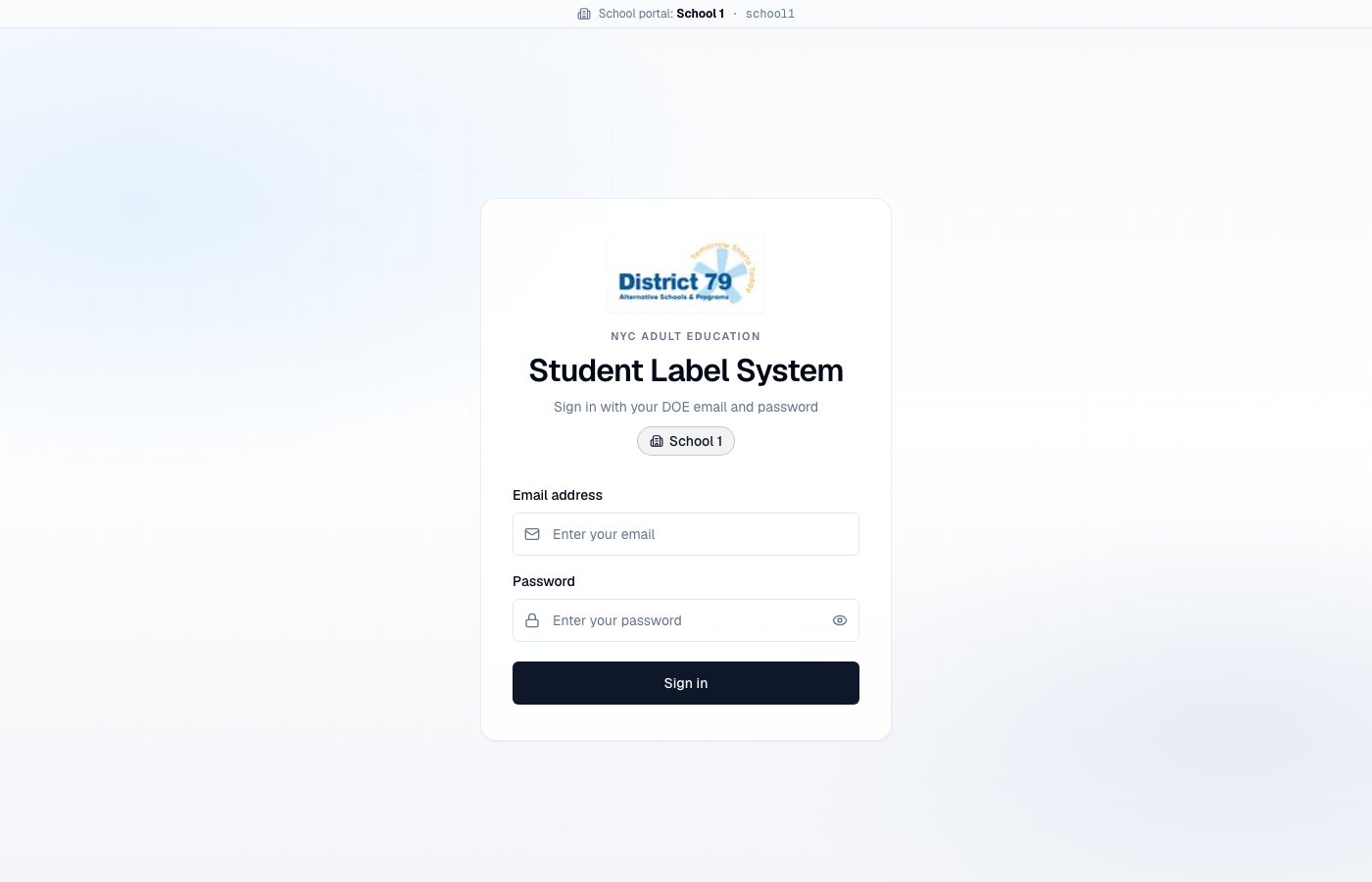
2. Open `https://school1.nycadultedlabels.nyc/auth/signin` — should show **School 1** (or the name for that slug)
3. Sign in as a School 1 Data Lead on `school1.…` — should land in the app with a small “School portal: …” bar
4. Sign in as that same user on `school8.…` — should see **Wrong school portal**
5. Sign in as Admin on either host — should work; Admin can open all schools
6. Confirm MFA still works on the school host
***
## 8. What to tell each school
Example message:
```text theme={null}
Your Student Label System portal:
https://school8.nycadultedlabels.nyc
Sign in with your DOE email, password, and MFA authenticator code.
Bookmark this URL. Do not use another school's subdomain.
```
***
## 9. Local development
Subdomains are usually **off** locally (`localhost` does not match `TENANT_ROOT_DOMAIN`).
Optional local test:
1. Add to `/etc/hosts` (macOS/Linux):
```text theme={null}
127.0.0.1 school1.localhost
```
2. Set:
```bash theme={null}
TENANT_ROOT_DOMAIN=localhost
NEXT_PUBLIC_TENANT_ROOT_DOMAIN=localhost
# Cookie domain on localhost is awkward — often skip NEXTAUTH_COOKIE_DOMAIN locally
NEXTAUTH_URL=http://localhost:3000
```
3. Visit `http://school1.localhost:3000` (browser support for `*.localhost` varies; Chrome is usually fine)
For most day-to-day work, keep local env without tenant vars and use the normal `http://localhost:3000` URL.
***
## 10. Troubleshooting
| Symptom | Likely fix |
| -------------------------------------------- | --------------------------------------------------------------- |
| School URL does not resolve | Wildcard DNS or Vercel `*.domain` missing |
| Sign-in works on apex but not on school host | Set `NEXTAUTH_COOKIE_DOMAIN=.nycadultedlabels.nyc` and redeploy |
| “Unknown school portal” | Slug in School Settings ≠ hostname label |
| Session drops when switching school ↔ apex | Cookie domain missing or wrong (needs leading `.`) |
| Still only works on vercel.app | Env vars not set in Vercel Production, or deploy not finished |
***
## Related
* [Data Lead and Admin tools](/admin/data-lead-tools) — School Settings overview
* [User roles](/user-roles) — MFA and permissions
* Repo env template: `.env.example`
***
## 1. Choose the root domain
Pick the domain that will hold school portals:
| Piece | Example |
| ------------- | --------------------------------------------- |
| Root (apex) | `nycadultedlabels.nyc` |
| School portal | `school1.nycadultedlabels.nyc` |
| Optional www | `www.nycadultedlabels.nyc` → redirect to apex |
The **slug** is only the first label (`school1`). It must match the value stored on the school record.
Reserved slugs (cannot be used): `www`, `app`, `api`, `admin`, `docs`, `auth`, `login`, `sso`, `staging`, `preview`, and similar.
***
## 2. DNS (one-time)
At your DNS provider (or Vercel DNS):
| Type | Name | Value |
| --------- | -------------- | ------------------------------------------ |
| A / CNAME | `@` (apex) | As shown in Vercel → Domains |
| CNAME | `www` | `cname.vercel-dns.com` (or Vercel’s value) |
| CNAME | `*` (wildcard) | `cname.vercel-dns.com` (or Vercel’s value) |
Wildcard `*.nycadultedlabels.nyc` is required. Without it, each new school would need its own DNS record.
Wait for DNS to propagate (often minutes; sometimes up to 24–48 hours).
***
## 3. Vercel domains (one-time)
In the Vercel project for Student Label System:
1. Open **Settings → Domains**
2. Add:
* `nycadultedlabels.nyc`
* `www.nycadultedlabels.nyc` (optional redirect to apex)
* `*.nycadultedlabels.nyc` (wildcard)
3. Complete any DNS verification Vercel requests
4. Confirm TLS certificates show as valid
You do **not** add `school1.nycadultedlabels.nyc` one-by-one when using a wildcard.
***
## 4. Environment variables
Set these in **Vercel → Settings → Environment Variables** (Production; Preview if you test custom domains there). Also mirror them in local `.env` when testing.
```bash theme={null}
# Required for subdomain routing
TENANT_ROOT_DOMAIN=nycadultedlabels.nyc
NEXT_PUBLIC_TENANT_ROOT_DOMAIN=nycadultedlabels.nyc
# Share login session across school1.nycadultedlabels.nyc and nycadultedlabels.nyc
# Leading dot is required
NEXTAUTH_COOKIE_DOMAIN=.nycadultedlabels.nyc
# Apex URL for NextAuth (not a school subdomain)
NEXTAUTH_URL=https://nycadultedlabels.nyc
# Keep public app URL pointing at the canonical host you want in emails/QR if needed
NEXT_PUBLIC_APP_URL=https://nycadultedlabels.nyc
```
| Variable | Purpose |
| -------------------------------- | ----------------------------------------------------- |
| `TENANT_ROOT_DOMAIN` | Server-side host parsing (`school1.` + this value) |
| `NEXT_PUBLIC_TENANT_ROOT_DOMAIN` | Shown in School Settings UI examples |
| `NEXTAUTH_COOKIE_DOMAIN` | Lets the session cookie work on all school subdomains |
| `NEXTAUTH_URL` | Canonical auth base URL (use the **apex**) |
After changing cookie or auth URL vars, redeploy and have users sign in again (old cookies may be host-scoped).
Leave these unset (or blank) to stay on single-host mode (Vercel default URL only).
***
## 5. School Settings — subdomain slug
1. Sign in as **Admin**
2. Go to **Admin → Schools** (`/admin/schools`)
3. Edit each school
4. Set **Subdomain slug**, for example:
| School name | Suggested slug | Portal URL |
| ----------- | -------------- | ----------------------------------------- |
| School 1 | `school1` | `https://school1.nycadultedlabels.nyc` |
| School 8 | `school8` | `https://school8.nycadultedlabels.nyc` |
| District 79 | `district79` | `https://district79.nycadultedlabels.nyc` |
Rules:
* Lowercase letters, numbers, hyphens only
* Unique across schools
* 2–48 characters
* Built-in schools default to `school1`…`school8` and `district79` when no custom slug is saved yet
Save the school. The slug is what the hostname must use.
***
## 6. How the app behaves
| Host | Behavior |
| ------------------------------------------------------- | ------------------------------------------------------------------------- |
| `nycadultedlabels.nyc` / `www` / current `*.vercel.app` | **Apex mode** — no school forced by URL; Admin can manage all schools |
| `school8.nycadultedlabels.nyc` | **School portal** — sign-in shows school name; banner shows portal school |
| Unknown slug (e.g. `xyz.nycadultedlabels.nyc`) | Warning: subdomain not linked to an active school |
| User assigned to School 1 on `school8.…` | Wrong-school banner (Admins are not blocked) |
Security still uses the user’s assigned school in the session/API. The subdomain does **not** replace role or school checks.
Public QR pages (`/student/…`, `/archive/box/…`) keep working on any host that reaches the app. Prefer one canonical host in printed QR URLs if you want stable links forever (`NEXT_PUBLIC_APP_URL`).
***
## 7. Smoke tests
After DNS + env + slugs:
1. Open `https://nycadultedlabels.nyc/auth/signin` — district sign-in (no school badge required)
2. Open `https://school1.nycadultedlabels.nyc/auth/signin` — should show **School 1** (or the name for that slug)
3. Sign in as a School 1 Data Lead on `school1.…` — should land in the app with a small “School portal: …” bar
4. Sign in as that same user on `school8.…` — should see **Wrong school portal**
5. Sign in as Admin on either host — should work; Admin can open all schools
6. Confirm MFA still works on the school host
***
## 8. What to tell each school
Example message:
```text theme={null}
Your Student Label System portal:
https://school8.nycadultedlabels.nyc
Sign in with your DOE email, password, and MFA authenticator code.
Bookmark this URL. Do not use another school's subdomain.
```
***
## 9. Local development
Subdomains are usually **off** locally (`localhost` does not match `TENANT_ROOT_DOMAIN`).
Optional local test:
1. Add to `/etc/hosts` (macOS/Linux):
```text theme={null}
127.0.0.1 school1.localhost
```
2. Set:
```bash theme={null}
TENANT_ROOT_DOMAIN=localhost
NEXT_PUBLIC_TENANT_ROOT_DOMAIN=localhost
# Cookie domain on localhost is awkward — often skip NEXTAUTH_COOKIE_DOMAIN locally
NEXTAUTH_URL=http://localhost:3000
```
3. Visit `http://school1.localhost:3000` (browser support for `*.localhost` varies; Chrome is usually fine)
For most day-to-day work, keep local env without tenant vars and use the normal `http://localhost:3000` URL.
***
## 10. Troubleshooting
| Symptom | Likely fix |
| -------------------------------------------- | --------------------------------------------------------------- |
| School URL does not resolve | Wildcard DNS or Vercel `*.domain` missing |
| Sign-in works on apex but not on school host | Set `NEXTAUTH_COOKIE_DOMAIN=.nycadultedlabels.nyc` and redeploy |
| “Unknown school portal” | Slug in School Settings ≠ hostname label |
| Session drops when switching school ↔ apex | Cookie domain missing or wrong (needs leading `.`) |
| Still only works on vercel.app | Env vars not set in Vercel Production, or deploy not finished |
***
## Related
* [Data Lead and Admin tools](/admin/data-lead-tools) — School Settings overview
* [User roles](/user-roles) — MFA and permissions
* Repo env template: `.env.example`